Managed security monitoring, on your premises
Attacks on your network, caught and explained in plain English.
The Pehra Box is a small computer next to your router. It watches your network, your computers and your cloud servers day and night, bans known attackers on its own, and sends one plain English alert to your phone when something needs you.
No obligation. We reply by email with a fixed price. Essentials from PKR 15,000 a month.
- 46 detection rules of our own
- Attackers banned in about 6 seconds
- Your logs stay in your building
Built on
- Wazuh
 Suricata
- CrowdSec
- Pi-hole
- Tailscale
- Cloudflare
- Ubuntu
- Nginx
Attacker
Scans and guesses passwords from the internet.
Click to send an attack
Pehra Box
Spots the attack and bans the address at the firewall.
Cloud VM
A VM inside your VPC in AWS, Google Cloud or Azure. Its agent reports to the Pehra Box over Tailscale, and the box can pull your VPC flow logs and CloudTrail or Azure or GCP audit logs instead of a mirror port.
Watched by: Device agents
Loading the example…
- Attacker Scans and guesses passwords from the internet.
- Internet line Where your provider's cable comes into the office.
- Office router Its mirror port (the green light) copies all office traffic to the Pehra Box.
- Your PCs An agent on each reports logins, new programs and file changes.
- Pehra Box Spots the attack and bans the address at the firewall.
- Analysts See it in Wazuh, over a private encrypted link.
- Your phone Gets the alert, in plain English.
- Cloud VM A VM inside your VPC in AWS, Google Cloud or Azure. Its agent reports to the Pehra Box over Tailscale, and the box can pull your VPC flow logs and CloudTrail or Azure or GCP audit logs instead of a mirror port.
- Rack switch (SPAN port) The top of rack switch's SPAN port copies the rack's traffic to the Pehra Box.
- Rack server Servers in the cabinet below the switch, each with an agent like the PCs.
Fig. 1. An attack reaching an office, a data center rack and a cloud server, with example data. Turn a sensor off to see which attacks slip through.
Security tools speak in log lines. You get the sentence.
Every event lands in Wazuh for our analysts. Here is a real Pehra rule firing in our lab, and the alert that reached the phone.
pehra-box: alerts.log
High on Wazuh's 0 to 15 scale, so it goes to your phone.
The computer involved: RECEPTION-PC, matched from your device list.
A web address known to spread malware, on the abuse.ch ThreatFox list.
Already stopped. The computer never reached the site.
In your portal
HighRECEPTION-PC tried to open a malware site and was blocked. What to do: run a full antivirus scan on RECEPTION-PC. We will tell you if it happens again.
- High on Wazuh's 0 to 15 scale, so it goes to your phone.
- The computer involved: RECEPTION-PC, matched from your device list.
- A web address known to spread malware, on the abuse.ch ThreatFox list.
- Already stopped. The computer never reached the site.
Your logs never leave your building. The one alert that matters reaches your phone, in words you can act on.
What changes when a Pehra Box is on your desk
One alert, not a thousand log lines
You get a push notification only when something needs you, written as what happened, what it means and what to do. The technical detail is one tap away.
Attackers banned in about 6 seconds
CrowdSec bans an address that probes your network or guesses passwords at the firewall, in about 6 seconds in our tests, before anyone has to read anything.
Your logs stay in your building
Alerts and logs live on the Pehra Box in your office, clinic or rack. Only a short alert title, a file fingerprint for VirusTotal and an encrypted backup ever leave it.
Cloud servers join the same box
An agent on a server in AWS, Google Cloud, Azure or any VPS reports to your Pehra Box over an encrypted Tailscale link. One box covers the office, the rack and the cloud.
A person reads every serious alert
On Business and Managed SOC plans an analyst checks each high and critical alert in business hours and writes down what it means for you.
How it works
Three steps from a free port on your router to an alert on your phone.
- 01
We install the box
A Pehra Box goes next to your router, in your clinic, office or data center rack. The router or switch copies traffic to it, and agents go on the computers and servers you choose, including cloud VMs.
- 02
It watches, blocks and keeps the logs
Suricata reads the traffic copy, Wazuh reads the agents, Pi-hole blocks malware domains and CrowdSec bans attackers. Everything is stored on the box, in your building.
- 03
You get the alert and the next step
A push notification says what happened, what it means and what to do. On Business and Managed SOC plans an analyst follows up with you in business hours.
The analyst's screen, and yours
Every event from your Pehra Box lands in Wazuh, the open source platform our analysts work in. What reaches you is one short alert.
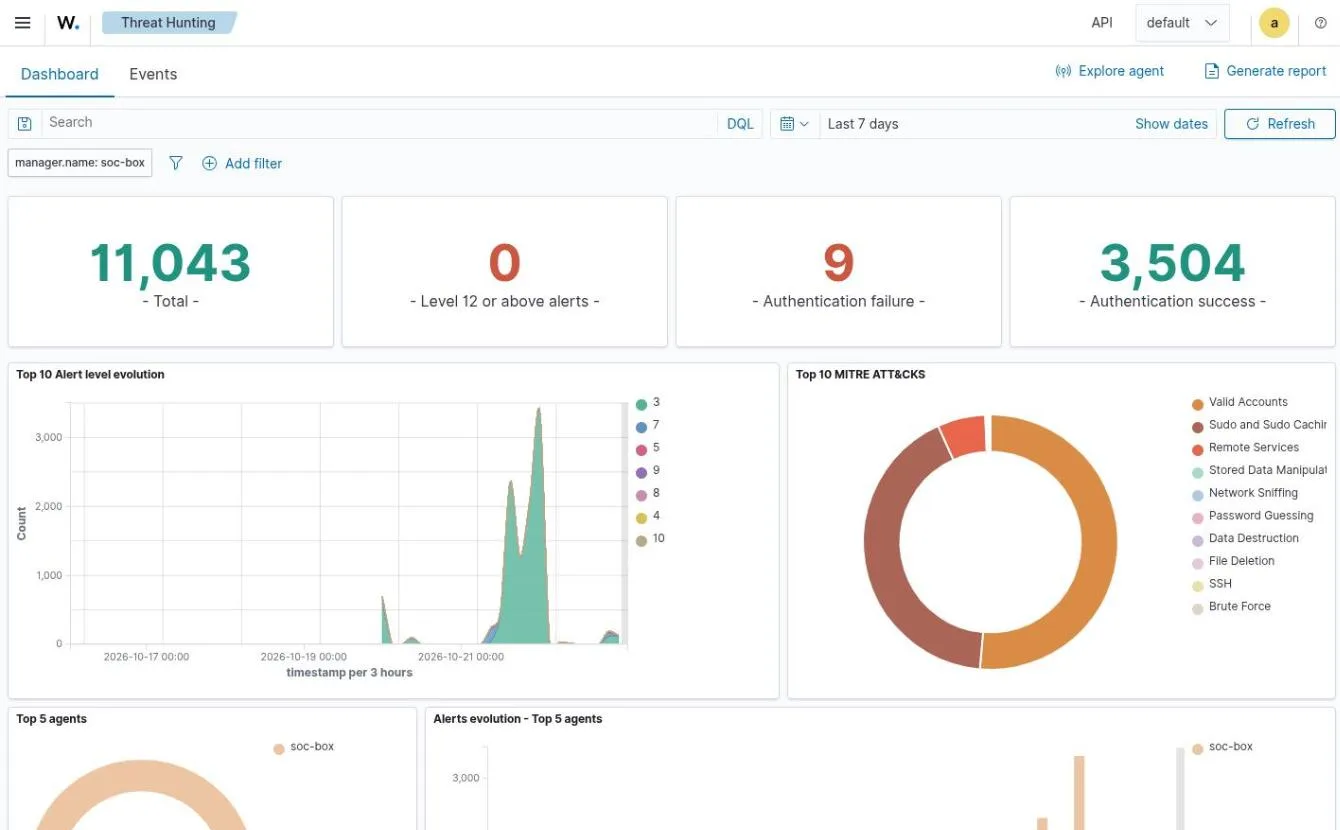
- Mark 1: 11,043 events in 7 days: everything Wazuh recorded on our lab network.
- Mark 2: No alerts at level 12 or above, so nothing critical that week.
- Mark 3: Most of the spike on 21 October is our own maintenance runs using sudo, which Wazuh logs as privilege use.
What you get instead
A push notification on your phone, only when something needs you.
Rules we wrote for small organisations
Wazuh ships thousands of general rules. We add 46 of our own for account takeover, data theft, malware and DNS tricks. After every change, 24 test events are replayed through them, and the change is undone if any result is wrong.
| Rule | What it catches | Severity |
|---|---|---|
| 100310 | A file on a computer matches a known malware fingerprintSeen by agents and threat intel, level 13Critical | Critical |
| 100613 | A login succeeds right after password guessing from the same addressSeen by the portal, level 12Critical | Critical |
| 100300 | A device talks to a server known for malware or remote controlSeen by network and threat intel, level 12Critical | Critical |
| 100721 | Data is being smuggled out through DNS lookupsSeen by DNS, level 12Critical | Critical |
| 100701 | A device uploads more than 200 MB in a single connectionSeen by network, level 10High | High |
| 100320 | A device looks up a known malware domain, and Pi-hole blocks itSeen by DNS and threat intel, level 10High | High |
| 100612 | A user probes for alerts that belong to another organisationSeen by the portal, level 10High | High |
| 100510 | The network sensor stops working, so we know when we are blindSeen by the Pehra Box itself, level 10High | High |
8 of our 46 rules.
The Pehra Box
One small computer does the work of a SIEM, an intrusion detection system and a DNS firewall. It keeps everything on site, and our analysts reach it over a private encrypted link.
- Size
- About a paperback book (18 × 18 × 3.5 cm). It sits next to your router, or on a shelf in your rack.
- Noise
- Quiet enough for an office desk. No server room needed.
- Your internet
- Not in the path: it watches a copy of the traffic, so if it switches off your internet keeps working.
- Beyond the office
- Servers in AWS, Google Cloud, Azure or any VPS report to the same box over an encrypted Tailscale link.
Specification
This is the standard build, and it covers an office of up to about 50 devices. Anything below can be changed for your site.
Standard build
- Mini PCBusiness grade, about 1 litre. Sits next to your router.
- ProcessorSix core Intel Core i5
- Memory16 GB RAM
- Storage256 GB NVMe SSD. Logs have their own partition, so they can never fill the system.
- NetworkA management port, plus a listen only capture port on your router's mirror port or your switch's SPAN port
- SoftwareUbuntu Server 24.04 LTS, hardened and audited
- BackupsEncrypted nightly (AES-256), then copied to a second location
- Remote accessOur analysts only, over a private encrypted tunnel. Nothing is open to the internet.
Built to order
The same software on hardware sized for your site, priced in your quote:
- More memory and storage, for longer log retention
- A 1U rack server instead of the mini PC, for data center uplinks
- A 10 GbE capture card for a 10 Gbps SPAN port
- A second box for a second site
Runs on business mini PCs such as
- ThinkCentre Tiny
- OptiPlex Micro
- Elite Mini
- NUC
What runs inside
Proven open source security tools, set up, tuned and kept up to date by us.
Wazuh
Collects events from every computer and server, and raises the alerts.
What we do with it: We run its agents, write our own rules on top of its, and work in its dashboard.
- Suricata
Watches the copy of your network traffic for attacks and scans.
What we do with it: We feed it the mirror or SPAN port and keep the ET Open rule set current.
CrowdSec
Bans attacking addresses at the firewall, in about 6 seconds in our tests.
What we do with it: We tune its decisions and use its shared lists of addresses other users have already seen.
Pi-hole
Blocks lookups of malware and phishing sites for every device.
What we do with it: We load daily threat lists and read its query logs to see which device asked for what.
Tailscale
The private encrypted link into the box.
What we do with it: Our analysts and your cloud agents use it, so nothing is open to the internet.
Cloudflare
The front door of your portal.
What we do with it: An email code at the edge and a tunnel the box opens itself, so no port is forwarded.
- And underneath:
- UbuntuUbuntu Server 24.04 LTS, hardened and audited
- NginxNginx, serving the portal and the dashboard
- OpenSearch, keeping alerts and logs on the box
- abuse.ch, daily lists of known bad addresses, domains and files
One box for the office, the rack and the cloud
Each customer gets their own Pehra Box, and every machine they care about reports to it, wherever it runs.
Office or clinic
The box sits next to the router. The router's mirror port copies traffic to it; agents go on the PCs.
Data center rack
The same build on a shelf, fed by a SPAN port on the top of rack switch. For 10 Gbps uplinks we size up the hardware.
Cloud servers
AWS, Google Cloud, Azure or any VPS. The Wazuh agent on each server reports to your box over Tailscale. No public port is opened.
Watches servers in
- Amazon Web Services
- Google Cloud
- Microsoft Azure
- DigitalOcean
- Hetzner
- any VPS
- your data center rack
Your portal
Each organisation gets a private portal that installs like an app. Its first screen answers one question: do we need to do anything?
Every alert explained, with the next step
Security tools speak in rule numbers and log lines. The portal turns each alert into what happened, what it means for you and what to do. The technical detail is one tap away, and raw logs stay with us.
Every computer and its weak spots
See which computers are online, when they last reported and which known vulnerabilities they have, so updates go where they matter most. A computer that stops reporting is flagged on your first screen.
A person reads every serious alert
Rules and automatic bans act in seconds. On Business and Managed SOC plans, an analyst then checks each high and critical alert and writes down what it means for you.
case 2026-1020-07: reviewed
Written by a person, in business hours, on Business and Managed SOC plans.
You are told plainly whether you need to act. Here, you do not.
If it happens again, the alert comes back to the top of the list.
- Written by a person, in business hours, on Business and Managed SOC plans.
- You are told plainly whether you need to act. Here, you do not.
- If it happens again, the alert comes back to the top of the list.
The analysts are the people who build the box: a small security team, built and run in Karachi, installed on site.
How the Pehra Box itself is protected
We hold the appliance to the same NIST SP 800-53 controls we would expect of any security supplier. Ask us for the full control mapping.
| NIST control | What we do |
|---|---|
| IA-2(1) | Two factor login for everyoneEvery portal account needs an authenticator code. Our analysts reach the box with SSH keys only. |
| AC-7 | Guessing gets you locked outFailed logins lock the account, and repeated probing gets the address banned at the firewall, in about 6 seconds in our tests. |
| SC-28, CP-9 | Encrypted backups, every nightConfiguration, keys and alert history are encrypted with AES-256 on the Pehra Box before they leave it. |
| CM-6 | Hardened, then auditedThe Lynis hardening index went from 58 to 81 on the appliance, and it is checked again after every change. |
| AU-2, AU-12 | Every admin action is logged18 audit rules record identity, sudo, SSH, firewall and root commands, and Wazuh watches them. |
| SC-7 | Nothing exposed to the internetA default deny firewall, no port forwarding on your router, and analyst access only over a private tunnel. Cloud agents arrive over the same tunnel. |
Plans
Every plan includes the Pehra Box, installation and the portal. Setup is quoted separately, and the larger plans are priced by the number of devices.
Essentials
Home office or small team, up to 10 devices
- Devices
- Up to 10
- Pehra Box, installation and portal
- Included
- Intrusion detection, DNS filtering, phone alerts
- Included
- Cloud servers over Tailscale
- Included
From PKR 15,000 a month
Request a quoteBusiness
Small business, up to 50 devices
Recommended for clinics and offices
- Devices
- Up to 50
- Pehra Box, installation and portal
- Included
- Intrusion detection, DNS filtering, phone alerts
- Included
- Cloud servers over Tailscale
- Included
- Threat intelligence and automatic blocking
- Included
- Vulnerability reports for every computer
- Included
- Encrypted nightly backups to a second location
- Included
- Analyst review of high and critical alerts
- Business hours
- Security report
- Quarterly
Quoted for you
Request a quoteManaged SOC
Clinics, firms and regulated organisations
- Devices
- By agreement
- Pehra Box, installation and portal
- Included
- Intrusion detection, DNS filtering, phone alerts
- Included
- Cloud servers over Tailscale
- Included
- Threat intelligence and automatic blocking
- Included
- Vulnerability reports for every computer
- Included
- Encrypted nightly backups to a second location
- Included
- Analyst review of high and critical alerts
- Extended hours
- Security report
- Monthly, mapped to CIS, ISO 27001 and NIST CSF
- Incident response support from our playbooks
- Included
- A named analyst
- Included
Quoted for you
Request a quoteThe Pehra Box stays ours: it is included in the monthly price, and we replace it free if it fails. The minimum term is 12 months, and setup is quoted separately.
Already have a mini PC or server? We can install Pehra on your own hardware and charge for the service only.
Questions
Something else? Ask us.
Essentials starts at PKR 15,000 a month, with the Pehra Box included, plus a setup fee paid once and a minimum term of 12 months. Business and Managed SOC depend on how many devices you want monitored. Send a quote request with a rough device count and we will reply with a fixed price. Send a quote request.
A small security team in Karachi. We build the appliance, write the detection rules and review the alerts ourselves.
Alerts and logs are stored on your Pehra Box. Push notifications carry only a short title. To check whether a downloaded file is malware, Pehra sends the file's fingerprint (a hash, not the file) to VirusTotal. Backups are encrypted before they are copied to a second location.
Yes. The same Wazuh agent that runs on your office PCs runs on a Linux or Windows server in any cloud or on any VPS. It reaches your Pehra Box over an encrypted Tailscale link, so no port is opened to the internet. Cloud audit logs, such as CloudTrail, can be pulled in on request.
Yes. The box goes on a shelf in the rack and takes a SPAN port from your top of rack switch instead of a router mirror port. Agents go on the servers as usual. For 10 Gbps uplinks we quote a larger box.
If it fails, we replace it free and restore your setup from the nightly encrypted backup. If it is stolen, we restore a replacement the same way. The disk itself is not fully encrypted yet, so keep the box somewhere locked, such as your network cabinet.
The Pehra Box is ours, so we collect it and securely wipe it. Your logs and alerts do not leave with anyone. The minimum term is 12 months.
A free port on your router (or a small switch with a mirror port) and an agent on each Windows or Linux computer you want watched. The portal works in any modern browser and installs on phones like an app.
No. The Pehra Box listens to a copy of your traffic on a separate port. It is not in the path between your network and the internet.
Open the portal in Safari, choose Share, then Add to Home Screen, open Pehra from the home screen and turn on notifications. Android, Windows and Mac browsers work directly.
Request a quote
Tell us a little about your organisation. There is no obligation, we reply by email with a fixed price, and we never share your details.
- 1.We reply by email with a few questions about your network.
- 2.A short call to agree the plan and a fixed price.
- 3.We install the Pehra Box and set up your portal accounts.